
Aura Bar · LED Troubleshooting Kit
1 Start Here: The 10-Second Reset
Lights out, stuck on one color, or doing a light show nobody asked for? This fixes it 9 times out of 10. You cannot break anything by doing this.
- Go to breaker panel E2. Write the panel's location on the line in the Breakers section below so the next person can find it.
- Flip breakers 32, 33, 35, and 36 to OFF. All four, every time.
- Count to 10. A real 10. This lets the power supplies fully drain.
- Flip all four back to ON.
- Give it a few seconds. The lights return to whatever the system tells them to do.
Still wrong? Look at the small black box with the red digital display (the DMX decoder, pictured at the bottom of this page). Match what its screen says to the table below.
2 What the Decoder's Screen Is Telling You
Each decoder has a 3-character red display. Healthy means it reads 001. Anything else is below.
| Display | What it means | What you do |
|---|---|---|
| 001 | Normal. That is the DMX address, and 001 is correct for this install.All Good | Nothing. Walk away proud. |
| OLA | Overload alarm. The decoder is being asked for more power than it wants to give.Reset | Turn breakers 32, 33, 35, 36 in panel E2 OFF, wait 10 seconds, turn back ON. If OLA comes back, leave the breakers OFF and call KG3. |
| OHA | Overheat alarm. The decoder is too hot.Cool + Call | Breakers OFF. Make sure nothing is stacked on or against the decoder. Wait 15 minutes, then back ON. If it repeats, call KG3. |
| P05 (any P number) | Lost its control signal. It is running a built-in color pattern on its own. This is why the lights are "doing a rainbow thing."Reset | Do the 10-second reset. If the P number returns, a data cable got unplugged or damaged. Call KG3. |
| L-1 (L-1 to L-8) | Same problem, different costume. Lost signal, running a built-in dimmer mode.Reset | Same as above: 10-second reset, then call KG3 if it comes back. |
| 047 | Wrong address. Any number that is not 001 means someone pressed buttons. Lights respond wrong or not at all.Fix It | Tap the ◀ arrow (hold it to move fast) until the screen reads 001. Done. |
| RES | Factory reset. Someone held both arrow buttons. The defaults happen to work here, so the bar still functions.Tell KG3 | Lights should still work. Text KG3 so we can verify the settings on our next visit. |
| blank | No power to the decoder.Breakers | Check breakers 32, 33, 35, 36 in panel E2. If they are on and the screen is still dark, call KG3. |
3 Match the Symptom
If you would rather start from what you see behind the bar instead of the decoder screen.
| What you see | What is actually happening | What to do |
|---|---|---|
| Everything dark | No power to the LED system | 10-second reset (Section 1). Then check the decoder screen is not blank. |
| Lights cycling colors on their own, ignoring everything | Decoder lost its control signal and started a built-in pattern | 10-second reset. Screen should read 001, not P-anything. |
| One zone out (screen glow fine, under bar dead, or vice versa) | That zone's breaker or decoder dropped | 10-second reset all four breakers. Check each decoder screen reads 001. |
| Colors are wrong (everything tinted, red where blue should be) | A decoder's address got changed | Set the screen back to 001 with the ◀ arrow. |
| Bright at one end, dim and orange at the far end | Voltage drop or overload, system is straining | 10-second reset. If it persists or the screen shows OLA, leave OFF and call KG3. |
| Looks fine in person, flickers on phone video | The LED refresh rate vs. the camera, a settings tweak on our end | Not a fault. No action needed. Mention it to KG3 and we will raise the PWM frequency. |
4 Breakers: Panel E2
These four circuits feed the LED power supplies. Fill in what each one feeds as you confirm it, then this sheet becomes your map.
Anything you type here saves automatically in this browser and prints on the paper copy.
5 The Settings That Must Not Change
You never need to program anything. You only ever need to put things back. This is "back."
| CH 1 | RED |
| CH 2 | GREEN |
| CH 3 | BLUE |
| CH 4 | not used (RGB install, no white channel) |
6 The Three Buttons (and Which Ones Bite)
Each decoder has M ◀ ▶ under the display. Short taps are safe. Long holds get you in trouble.
Safe
- Tap ◀ or ▶ while a number shows: changes the address one step. This is how you get back to 001.
- Hold ◀ or ▶ briefly: scrolls the address fast.
- Tap M: cycles the display between modes. Keep tapping until a 3-digit number shows, then arrow back to 001.
- Do nothing for 10 seconds: the decoder exits any menu by itself.
Do Not
- Never hold ◀ + ▶ together for 2 seconds. That is a factory reset (screen shows RES).
- Never hold M + ◀ together. That opens the engineering menu (decode mode, PWM frequency, dimming curve). Wrong values in there = a service call.
- Never leave the display on a P or L mode on purpose. The bar's controller cannot talk to it in those modes.
7 Where Everything Lives
Back bar elevation, based on the install drawings. The glowing lines are the KG3 LED runs. D = DMX decoder, P = power supply. The shelf lighting was installed by others, so it is not KG3 equipment and nothing in this kit applies to it.
8 Know Your Hardware
This is the box you are looking for. There is more than one of them. They all follow the same rules.
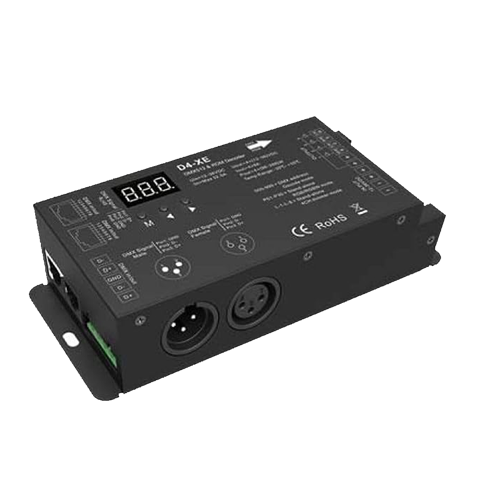
- Device
- D4-XE 4-Channel Constant Voltage DMX512 Decoder
- Job
- Listens to the bar's lighting controller and dims the LED accordingly
- Display
- Should read 001 at all times
- Output
- RGB COB LED neon, PWM dimmed, 3 channels used
- Protection
- Auto-recovers from overheat and short circuit. OLA and OHA alarms mean it is protecting itself, not broken.
- Full manual
- Included at the back of the printed kit. Online: link below.
9 When to Stop and Call
Reset did not fix it, OLA keeps returning, anything smells hot, or you are just not sure. Never guess at wiring.
- Take a photo of the decoder display before you call. It answers half our questions.
- Tell us which breakers you already cycled and what changed.
- If anything is hot to the touch or smells burnt: breakers OFF, leave them off, call immediately.